iPhone Repair Tips
iPhone Water Damage in Bali? What to Do If Your iPhone Gets Wet
Got your iPhone wet in Bali? Learn what to do immediately, what to avoid, and when water damage may require professional inspection or repair.
 Bali Phone RepairRepair - Trade - Rental
iPhone Repair Tips
Got your iPhone wet in Bali? Learn what to do immediately, what to avoid, and when water damage may require professional inspection or repair.
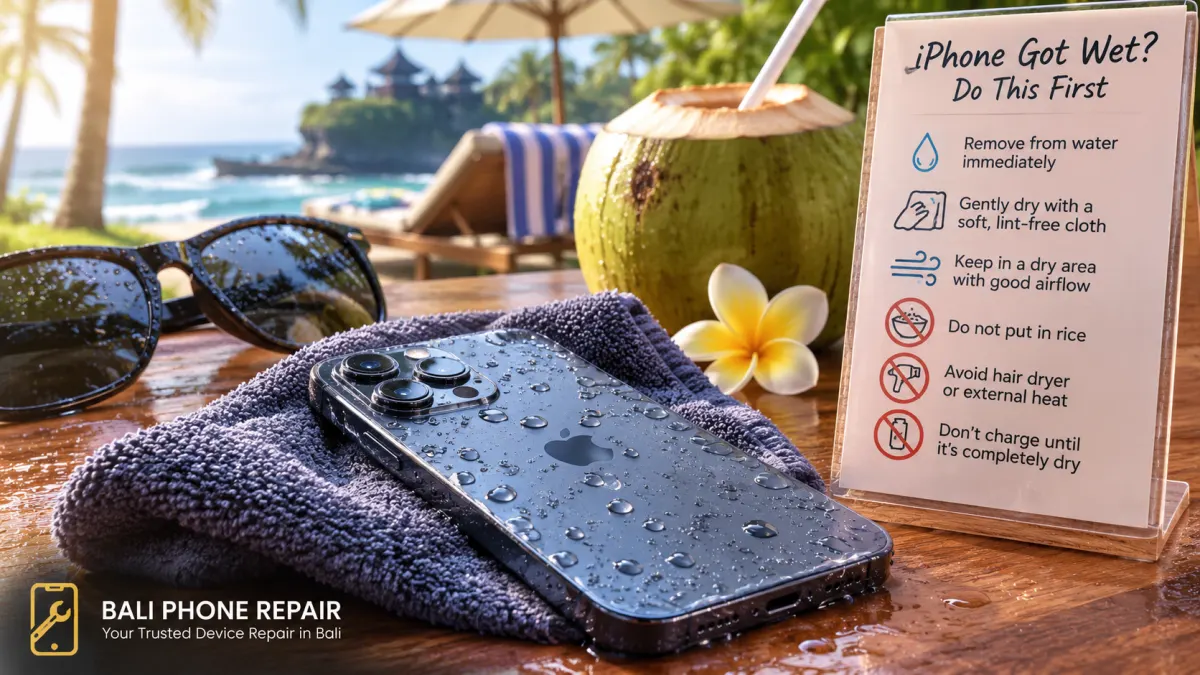
Getting your iPhone wet in Bali can happen faster than you expect. A sudden tropical downpour, a splash by the pool, a spilled drink at a café, or a day at the beach can leave you wondering whether your iPhone is still safe to use.
If your iPhone has been exposed to water or another liquid, what you do next matters. Avoid rushing to charge it or repeatedly turning it on. Give the device time to dry and watch for signs that it may need professional inspection.
Remove the iPhone from the water or liquid as quickly as possible. If a charging cable or accessory is connected, disconnect it.
Gently wipe the outside of the phone with a soft, lint-free cloth. Hold the iPhone with the charging connector facing downward and gently tap it against your hand to help remove excess liquid. Then leave the device in a dry place with good airflow.
Avoid repeatedly pressing buttons, reconnecting accessories, or testing every function while the phone is still wet. At this stage, the priority is to allow moisture to escape without introducing additional problems.
Putting a wet phone in a bag of rice is a popular internet tip, but it is not recommended for an iPhone. Small particles can enter the charging connector and potentially create additional problems.
Instead, leave the iPhone in a dry, well-ventilated area and allow natural airflow to help it dry.
It can be tempting to use a hair dryer when you need your phone back quickly, especially while travelling in Bali. Avoid doing this. External heat can expose the iPhone to temperatures that may damage internal components.
Compressed air should also be avoided. Trying to force moisture out of the device can push liquid further into areas where you do not want it.
If moisture is present inside the charging connector, connecting a cable can damage the connector or cable pins. Leave the iPhone disconnected while it dries.
If the phone displays a liquid-detection warning, disconnect the charging cable and give the connector more time to dry. If the warning returns when you try again, moisture may still be present.
If charging continues to fail after the device has had sufficient time to dry, see our iPhone Not Charging in Bali guide for additional troubleshooting steps.
Compatible iPhone models can detect liquid in the Lightning or USB-C connector. When this happens, the phone may display a warning and temporarily restrict cable charging or accessory use.
This protection helps reduce the risk of damage to the connector. Repeatedly reconnecting a cable while moisture is present can contribute to corrosion or damage to the connector and cable pins.
If you see a liquid-detection warning, disconnect the cable and allow both the iPhone and the cable to dry before trying again.
Not every liquid exposure presents the same risk. Rain or fresh water is different from swimming-pool water, seawater, soft drinks, coffee, or other liquids that can leave contaminants behind.
This is particularly relevant in Bali, where phones are frequently used around beaches, swimming pools, boats, cafés, and outdoor activities.
Seawater deserves particular attention because salt and minerals can remain after the visible water has evaporated. Pool water and drinks can also leave residues behind.
If your iPhone was submerged in seawater, pool water, or another contaminated liquid rather than briefly splashed with fresh water, professional inspection may be sensible even if the device initially appears to work normally.
An iPhone may appear normal immediately after getting wet and develop problems later. Watch for changes in the hours and days following the incident.
If any of these symptoms appear, repeatedly using or charging the device may not be a good idea until the cause has been checked.
Sometimes, but there is no single answer for every water-damaged iPhone. The outcome depends on the type of liquid, how long the device was exposed, which components were affected, and what happened after the incident.
A brief splash and a phone that has been submerged are very different situations. Internal corrosion can also develop over time, which is why a device that works immediately after getting wet is not necessarily free from damage.
A proper inspection can help determine whether the device needs cleaning, repair of an affected component, or another solution. Diagnosis should come before assuming that a particular part needs replacement.
Liquid exposure does not always result in a completely dead phone. In some cases, the iPhone may continue to work but develop unusual battery behaviour, unexpected heat, shutdowns, or significantly faster battery drain.
If battery performance changed after the incident, do not automatically assume that replacing the battery will solve the problem. The device should be considered as a whole because liquid exposure can affect more than one component.
For battery-related symptoms, see our iPhone Battery Draining Fast in Bali guide.
If you decide to have the iPhone checked, a few details can make diagnosis easier. Tell the technician what happened rather than simply saying that the phone stopped working.
These details can help narrow down what should be inspected first.
If your iPhone gets wet while you are living in or visiting Bali, you do not have to guess which component needs replacing. Bali Phone Repair can inspect the symptoms and help determine an appropriate next step based on the condition of the device.
This can be particularly useful for travellers who depend on their phone for maps, accommodation, transportation, communication, payments, and travel bookings while in Bali.
For diagnosis and repair options, visit our iPhone repair service in Bali.
When contacting us, include your iPhone model, your location in Bali, the type of liquid involved, when the incident happened, and the symptoms you are currently experiencing.
No. Do not put a wet iPhone in rice. Small particles can enter the connector and potentially create additional problems. Leave the device in a dry area with good airflow instead.
Avoid using a hair dryer, external heat, or compressed air. Allow the iPhone to dry naturally in a well-ventilated location.
The warning means the iPhone has detected liquid in the charging connector. Disconnect the cable and allow the connector to dry before trying wired charging again.
Not necessarily. Some liquid-related problems can appear later, particularly if contaminants or corrosion affect internal components. Monitor the phone for unusual charging, display, camera, speaker, microphone, battery, or temperature behaviour.
Seawater contains salt and minerals that can remain after the visible water evaporates. If an iPhone has been submerged in seawater, professional inspection may be appropriate even when the device initially appears to function normally.
It may be possible, but the answer depends on the extent of the damage and which components have been affected. Inspection is needed before determining the appropriate repair.
Bali Phone Repair can inspect liquid-related iPhone problems in Bali. When contacting us, provide the iPhone model, what liquid it was exposed to, when it happened, and any symptoms that appeared afterward.
If your iPhone has been exposed to rain, pool water, seawater, or another liquid, avoid experimenting with quick fixes that could make the problem worse.
Contact Bali Phone Repair on WhatsApp at +62 819-2916-4999 and explain what happened. Providing your iPhone model, location, type of liquid, and current symptoms can help us understand the situation before you arrange an inspection.
For broader diagnosis and repair options, visit our iPhone Repair Bali service page.
Need professional help?
Send your device model, issue, photos, and location so our team can suggest the next practical step.
Related articles
Need iPhone repair while travelling in Bali? Learn what tourists should check before repair, what information to provide, and how to arrange practical repair support during your trip.
Read articleBroken your iPhone while in Bali? Learn what to do after drops, screen damage, charging problems or liquid exposure, and when professional diagnosis may be needed.
Read articleIs your iPhone touch screen not working in Bali? Learn common causes of unresponsive or erratic touch, safe checks to try, and when professional diagnosis may be needed.
Read article